
Auth0 In Production
A practical look at integrating Auth0 into a production application.
1. Introduction
Moving from scattered login systems to a centralized Identity Provider (IdP) is a major maturity leap for any engineering team. This guide outlines the exact steps to implement Auth0 across a suite of modern web applications, detailing both the dashboard configuration and the code implementation.
2. The Problem
In a growing tech ecosystem, applications often start by managing their own authentication. This leads to fragmented identity:
- UX Friction: Users are forced to remember multiple credentials and log in separately to every internal tool.
- Administrative Nightmare: Onboarding and offboarding requires manual database updates across multiple different systems.
- Security Risks: Fragmented authentication makes it nearly impossible to enforce global security policies, like mandatory Multi-Factor Authentication (MFA).
3. The End Goal
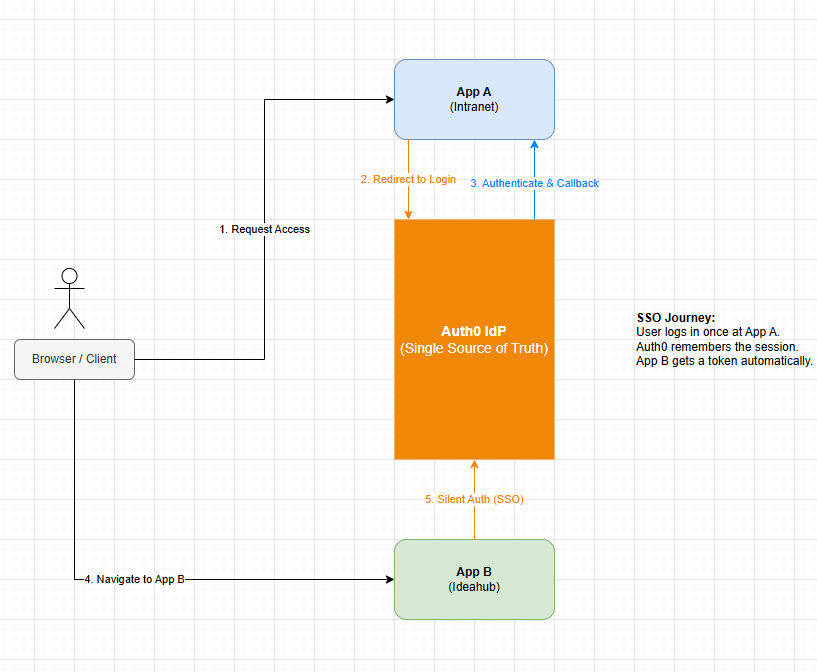
A Centralized "Single Source of Identity." Applications no longer verify passwords or manage login screens; they delegate that responsibility entirely to Auth0. When a user logs into App A, Auth0 establishes a session. When the user navigates to App B, Auth0 recognizes the session and issues a token instantly, resulting in a seamless, password less login experience across the entire suite of applications.
4. Step-by-Step: Auth0 setup
Before touching any code, the Auth0 Tenant must be configured correctly.
4.1 Create Applications (The Frontend)
In the Auth0 Dashboard, go to Applications > Applications and click Create Application. Choose Single Page Web Applications (SPA) for frameworks like React, Vue, or Angular. Once created, you will see your Domain and Client ID. These must be applied in the frontend auth file, to bridge auth0 and the app.
- Domain: 9 The address of your Auth0 server (e.g., dev-xyz.us.auth0.com). It tells your app exactly where to go to find the login screen.
- Client ID: The unique public ID for your app. It tells Auth0 which specific application is currently asking for a login.
Security Myth-Buster: Why are these public? They are not secrets. In an SPA (Single Page App), nothing is secret because the code lives in the user's browser. Security is instead handled by the Allowed URLs you define below. Even if a malicious actor knows your Client ID, Auth0 will refuse to talk to them unless the request comes from your specific domain and redirects to your specific callback.
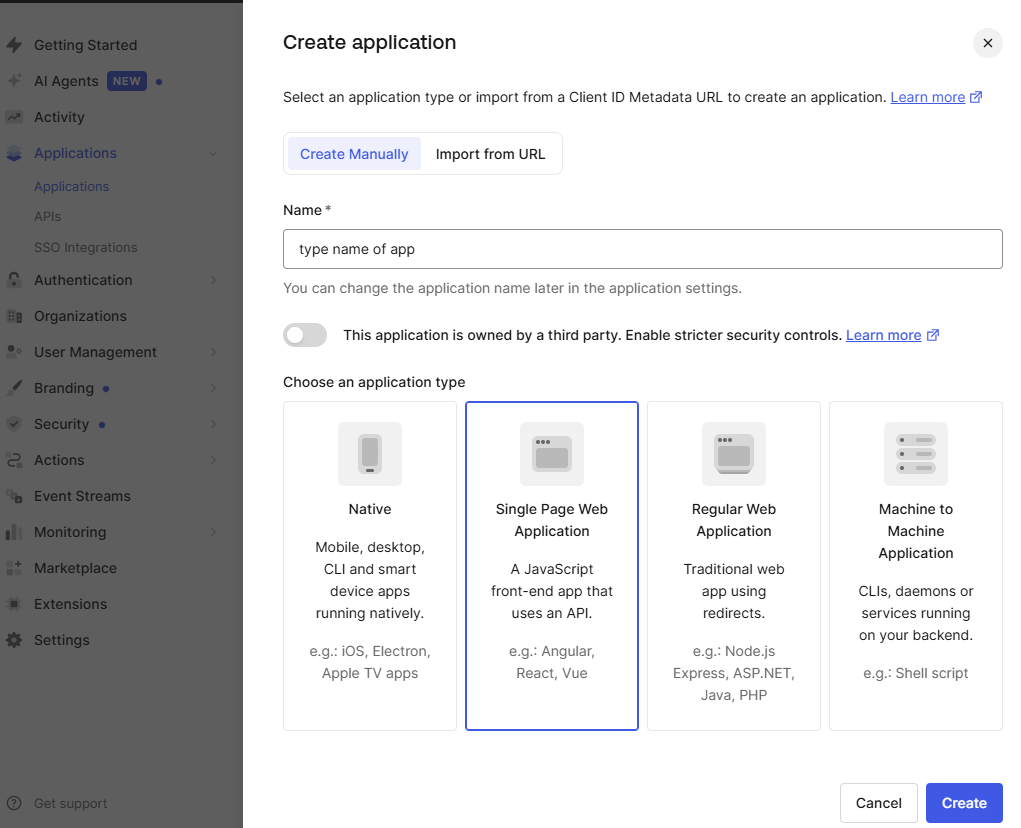
You must configure the URLs where Auth0 is allowed to send the user:
- Allowed Callback URLs: http://localhost:5000/callback, http(s)://your-app.com/callback
- Allowed Logout URLs: http://localhost:5000, http(s)://your-app.com
- Allowed Web Origins (CORS): http://localhost:4200, http(s)://your-app.com

4.2 Create APIs (The Backend)
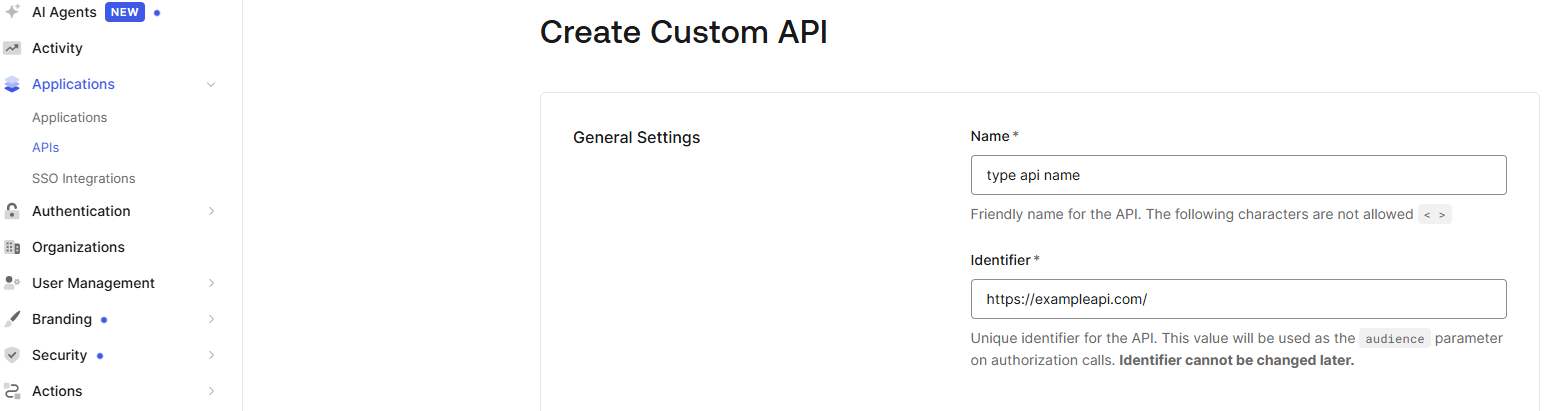
Go to Applications > APIs and click Create API. This represents your backend server.
- Identifier (Audience): Give it a unique URL (e.g., https://api.yourcompany.com). Your frontend will request tokens specifically for this "Audience."
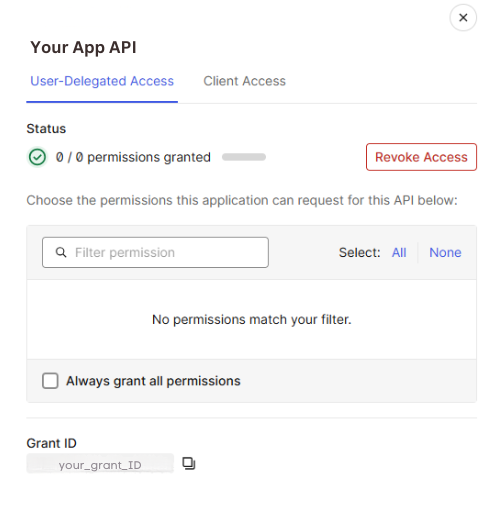
WARNING: The "Client Not Authorized" Gotcha
Simply creating the App and the API isn't
enough. You must explicitly authorize the SPA to access the API. In your API settings, go
to the Machine-to-Machine Applications tab and toggle the switch for your SPA.
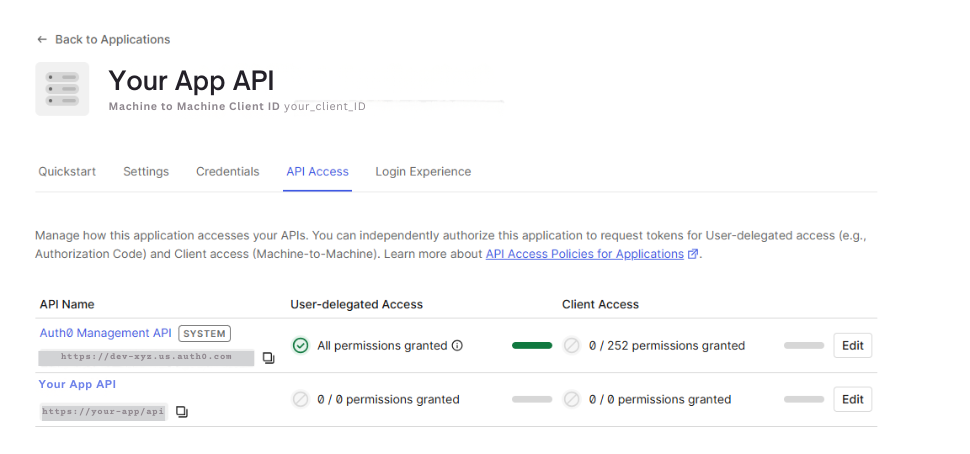
To validate the user's token, your backend only needs two things:
- Domain: To verify the token came from your Auth0 tenant.
- Audience:To verify the token was specifically intended for this backend and not some other app.
Note: You don't need the Client ID here because the "Audience" serves as the ID for your backend.
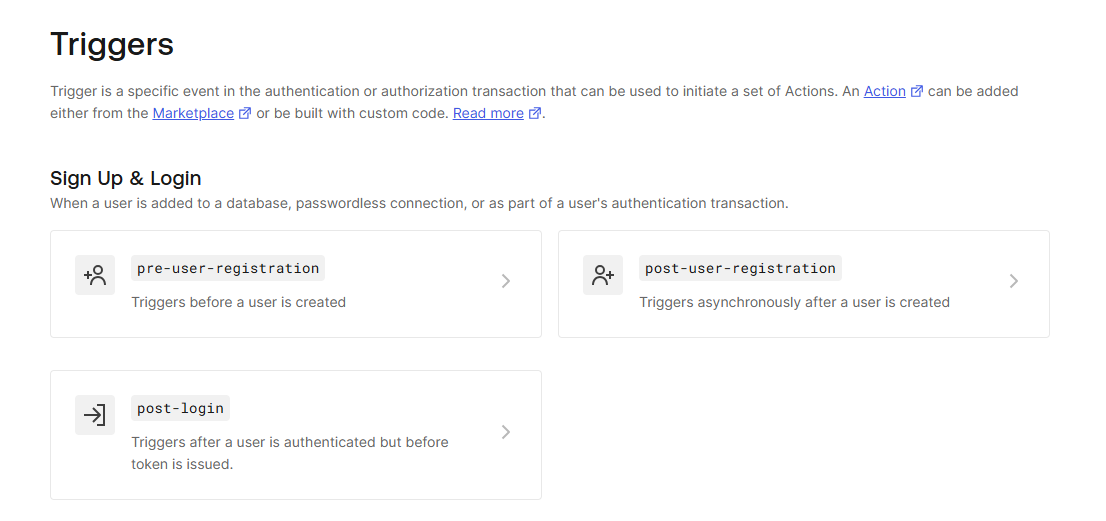
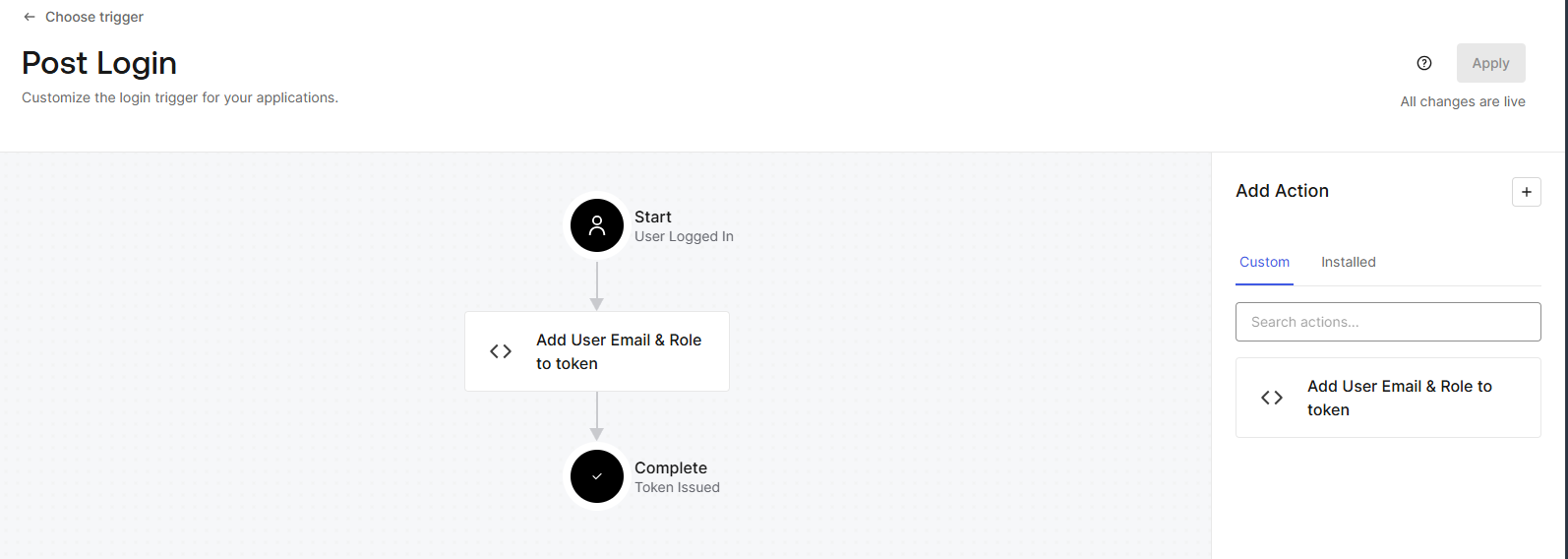
4.3 Auth0 Actions (The Email and Role Claim Trigger)
By default, Auth0 Access Tokens are "opaque." If your backend needs to know the user's email or role you must inject it into the token using an Action.
Navigate to the Actions tab and then click on the Triggers -> Post Login.
5. Lessons Learned
Once the dashboard is configured, you must integrate the SDKs. Here are the critical edge cases.
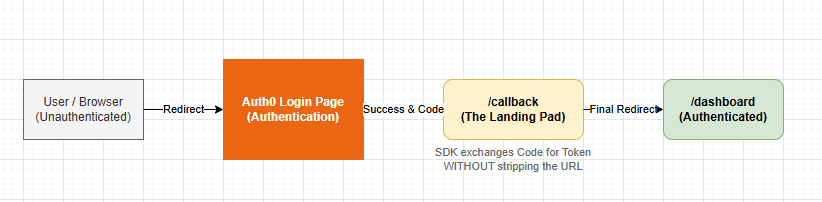
Frontend Pitfall: The Router Race Condition If your root route (/) immediately redirects users, it might strip the ?code=xyz parameter before the SDK can read it.
Why does this happen? When Auth0 sends a user back to your app, it puts a "secret code" in the URL. The Auth0 SDK needs to "grab" that code to finish the login. However, most modern apps have a "Gatekeeper" (a Router) that checks if you're logged in. If the Gatekeeper sees you aren't logged in yet, it immediately kicks you to the /login page. By moving you, the Gatekeeper wiped the secret code out of the URL before the SDK could even see it.
The "Delivery Courier" Analogy: Imagine you are waiting for a courier (Auth0) to deliver a secret package to your front porch (The URL). If, the second you see the courier's truck, Auth0 Technical Guide| May 2026 you decide to run to the backyard (Redirect), you’ll miss the delivery. The courier leaves, the package is gone, and you’re stuck outside.
The /callback route is like a Waiting Chair placed specifically on the front porch. You stay there, wait for the package to be handed to you, and only then do you go inside the house.
5.1 Infrastructure Lesson: Docker Build Variables
If your frontend is a static bundle served by Nginx, standard .env files are ignored during the docker build. The Fix: Pass variables as --build-arg in your docker-compose.yml.
5.2 Backend Lesson: Just-In-Time (JIT) Provisioning
App-Specific-scenario: When a user logs in for the first time, they will be authenticated by Auth0, but they might not exist in your local database yet.
- Automated Provisioning: Use the email claim from the token to check if the user exists in your DB. If not, create a local record for them immediately so your application logic (like assigning owners to data) has a user record to point to. This is for already existing apps that were using manual authentication.
- Email Bridging: This ensures that if you already have legacy users in your database, they are seamlessly linked to their new Auth0 identity without losing any data.
6. Conclusion
By treating Auth0 as the single source of identity and handling edge-cases like JIT provisioning and router race conditions defensively, you can eliminate manual password management, token handling entirely and provide a professional, frictionless authentication experience for your users.